Overview
This guide shows how to configure Myriad OCP or OCP Pro to send song metadata to your Canstream server at radio.canstream.co.uk.
For better detail and support, please consult the Broadcast Radio website. This guide is correct at the time of writing however the OCP software could be updated or changed leaving to this becoming out of date.
Before You Start
Get Your Details from Centovacast
- Log into your Centovacast control panel
- Note down:
- Port number (e.g., 8000, 8002, 8004)
- Admin password (found in Admin Password section)
- Mountpoint name (e.g.,
/live.mp3)
Add Icecast Output in OCP
- Open Myriad OCP/OCP Pro
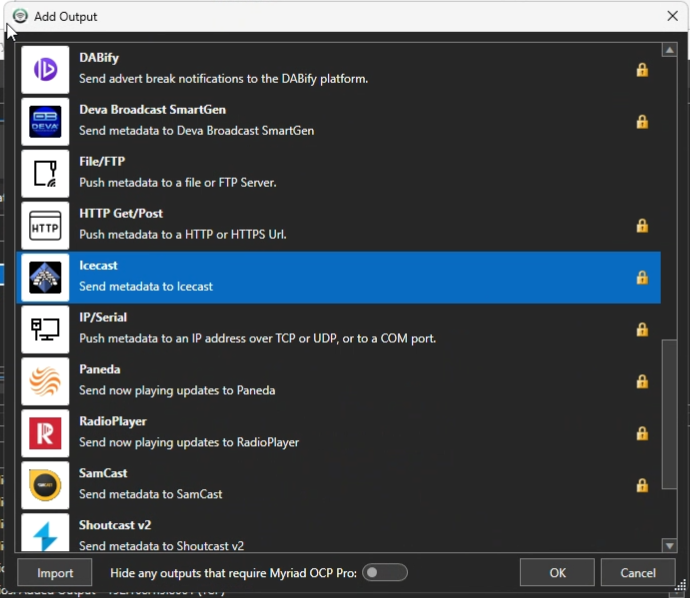
- Click "Add Output" → Select "Icecast"
- Choose "Send metadata to Icecast"
- Ensure the output is unlocked (no lock icon)
Configuration Settings
Connection:
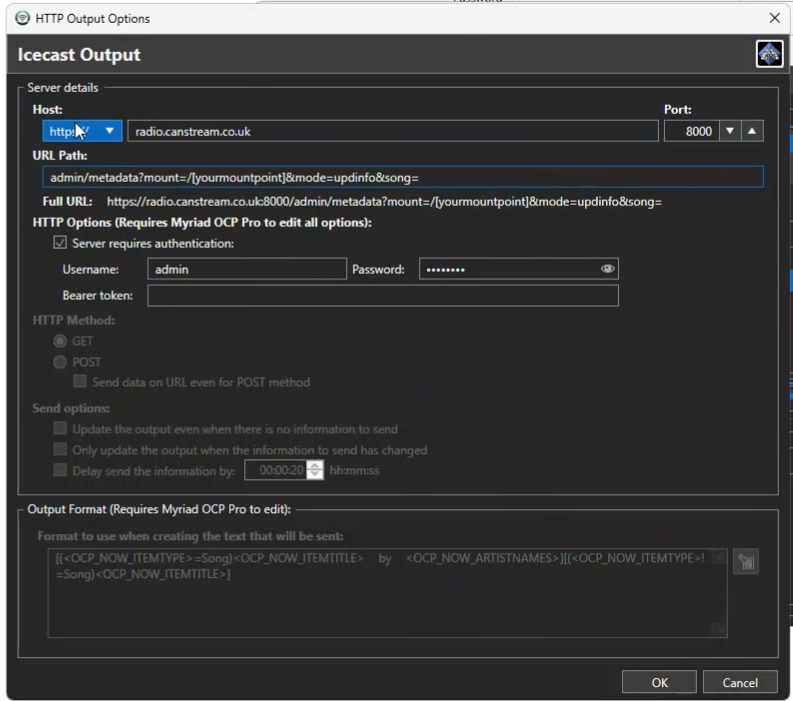
- Host:
radio.canstream.co.uk - Port:
[your port from Centovacast] - HTTP Method:
GET
Authentication:
- Username:
admin - Password:
[your admin password from Centovacast]
URL Path:
admin/metadata?mount=/[yourmountpoint]&mode=updinfo&song=Output Format Field:
This is where you specify what metadata to send using OCP variables.
Examples
Example 1: Dynamic Song Metadata (Most Common)
URL Path:
admin/metadata?mount=/live.mp3&mode=updinfo&song=Output Format:
<OCP_NOW_ITEMTITLE> by <OCP_NOW_ARTISTNAMES>Result: Updates with "Song Title by Artist Name" for each track
Example 2: Static Stream Title
URL Path:
admin/metadata?mount=/live.mp3&mode=updinfo&song=Output Format:
My Radio Station - Listen LiveResult: Always displays "My Radio Station - Listen Live" regardless of what's playing
Example 3: Separate Artist and Title Fields
URL Path:
admin/metadata?mount=/live.mp3&mode=updinfo&artist=&title=Output Format: Configure separate fields for:
- Artist:
<OCP_NOW_ARTISTNAMES> - Title:
<OCP_NOW_ITEMTITLE>
Note: Replace
/live.mp3with your actual mountpoint from Centovacast
Quick Troubleshooting
Authentication Failed:
- Check you're using "admin" as username
- Verify the admin password from Centovacast
- Ensure port matches Centovacast
Metadata Not Showing:
- Confirm HTTP Method is set to GET
- Check output is unlocked in OCP
- Verify mountpoint name includes the
/
Support
- Server issues: Contact Canstream support
- OCP software issues: Contact P Squared/Broadcast Radio
This guide applies to streams on radio.canstream.co.uk. Both OCP and OCP Pro use identical settings.